i.MX 6ULL Evaluation Kit
Pre-Preparation
Before starting to work with imx6ullevk, switch SW601 to device microSD by setting to OFF, OFF, ON, OFF (from 1–4 bit)
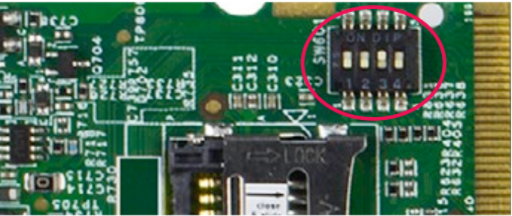
Fig. 42 SW601 settings
Preparation
The instructions in this section also applies to those boards with secure boot enabled. There are references on how to perform common instructions along with the flow. Security details the required background for secure boot.
Important
Ensure you replace <factory> placeholder below with the name of your Factory.
Download the necessary files from
https://app.foundries.io/factories/<factory>/targets:Click the latest Target with the platform trigger.
Expand the run in the Runs section which corresponds with the name of the board. Download the Factory image for that machine. For example:
lmp-factory-image-<machine_name>.wic.gz
u-boot-<machine_name>.itb
imx-boot-<machine_name>
Note
The compressed image (
.wic.gz) is used since LmP v92. Before, the scripts required a compressed file image (.wic).Download and extract the file
mfgtool-files-<machine_name>.tar.gz:tar -zxvf mfgtool-files-imx6ullevk.tar.gz
Organize all the files, mirroring the tree below:
├── lmp-factory-image-imx6ullevk.wic.gz
├── u-boot-imx6ullevk.itb
├── sit-imx6ullevk.bin
├── SPL-imx6ullevk
└── mfgtool-files-imx6ullevk
     ├── bootloader.uuu
     ├── full_image.uuu
     ├── SPL-mfgtool
     ├── u-boot-mfgtool.itb
     ├── uuu
     └── uuu.exe
Hardware Preparation
Set up the board for updating using the manufacturing tools:
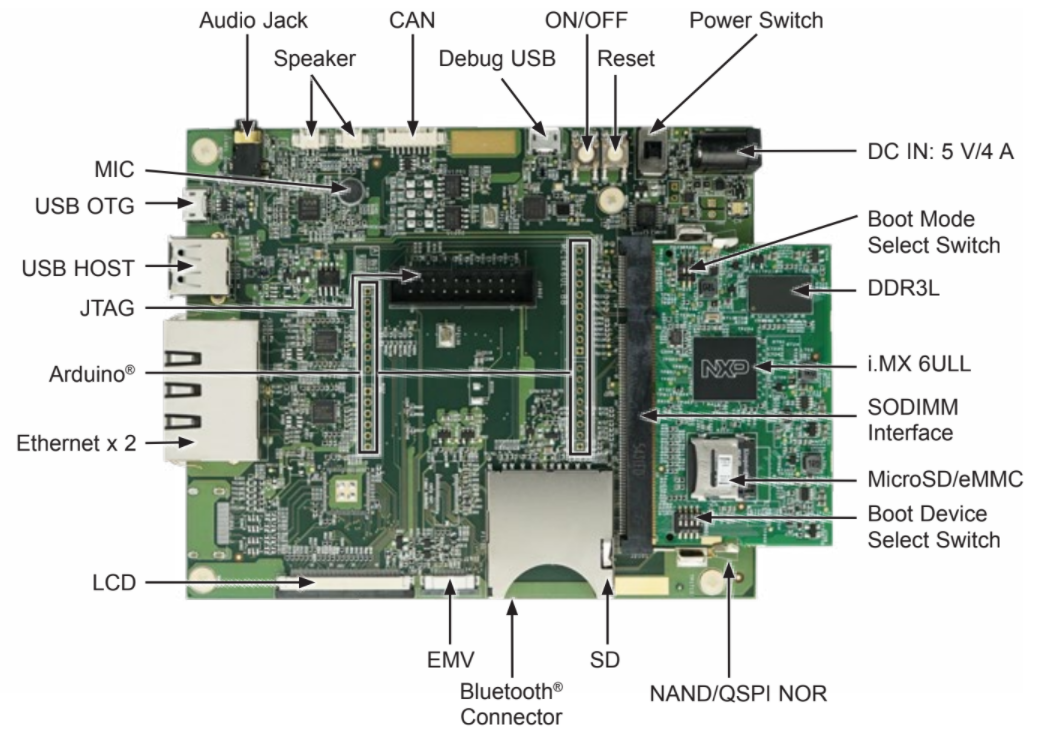
Top view of imx6ullevk
OPTIONAL. Only required if you have problems or want to see the boot console output.
Connect the micro-B end of the USB cable into debug port J1901. Connect the other end of the cable to a PC acting as a host terminal. One UART connections will appear on the PC. For example, on a Linux host:
ls -l /dev/serial/by-id/
 total 0
 lrwxrwxrwx 1 root root 13 Dec  3 13:09 usb-Silicon_Labs_CP2102_USB_to_UART_Bridge_Controller_0001-if00-port0 -> ../../ttyUSB2
Using a serial terminal program like minicom, connect to the port with
if00in the name (in this examplettyUSB2). Apply the following configuration:Baud rate: 115200
Data bits: 8
Stop bit: 1
Parity: None
Flow control: None
Ensure that the power is off (SW2001)
Put the imx6ullevk into programing mode:
Switch SW602 to OFF, ON (from 1-2 bit) to Download Mode.
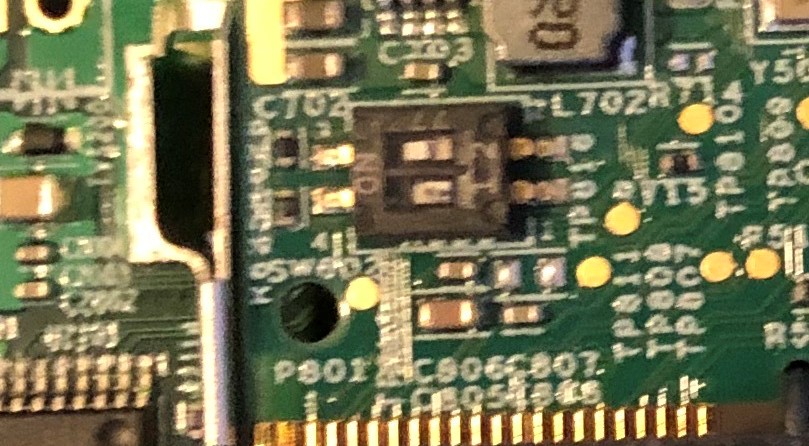
Location of SW602 dip switch on imx6ullevk
Connect your computer to the imx6ullevk board via the micro-B port 1
DownloadUSB OTG jack.Connect the 5V power plug to the port 2
PowerJ2001 jack.Power on the imx6ullevk board by sliding power switch SW2001 to ON.
Flashing
Once in serial downloader mode and connected to your PC, the evaluation board should show up as an NXP® USB device.
For instructions on how to sign the required images before flashing them to the board with secure boot enabled, see Machines with Secure Aspects Enabled by FoundriesFactory.
Verify target is present:
lsusb | grep NXP Bus 002 Device 052: ID 15a2:0080 Freescale Semiconductor, Inc.
In this mode you will use the
uuutools to program the images to the eMMC. TheUSB IDmay differ if a different SoC is used.To program the LmP to the EMMC run
$ sudo mfgtool-files-imx6ullevk/uuu mfgtool-files-imx6ullevk/full_image.uuu
  uuu (Universal Update Utility) for nxp imx chips -- libuuu_1.4.243-0-ged48c51

  Success 1    Failure 0


  1:92     6/ 6 [Done                                  ] FB: done
Turn off the power
Put the board into run mode
Start the
Device ManagerSelect
ViewSelect
Devices by containerVerify a device like the following:
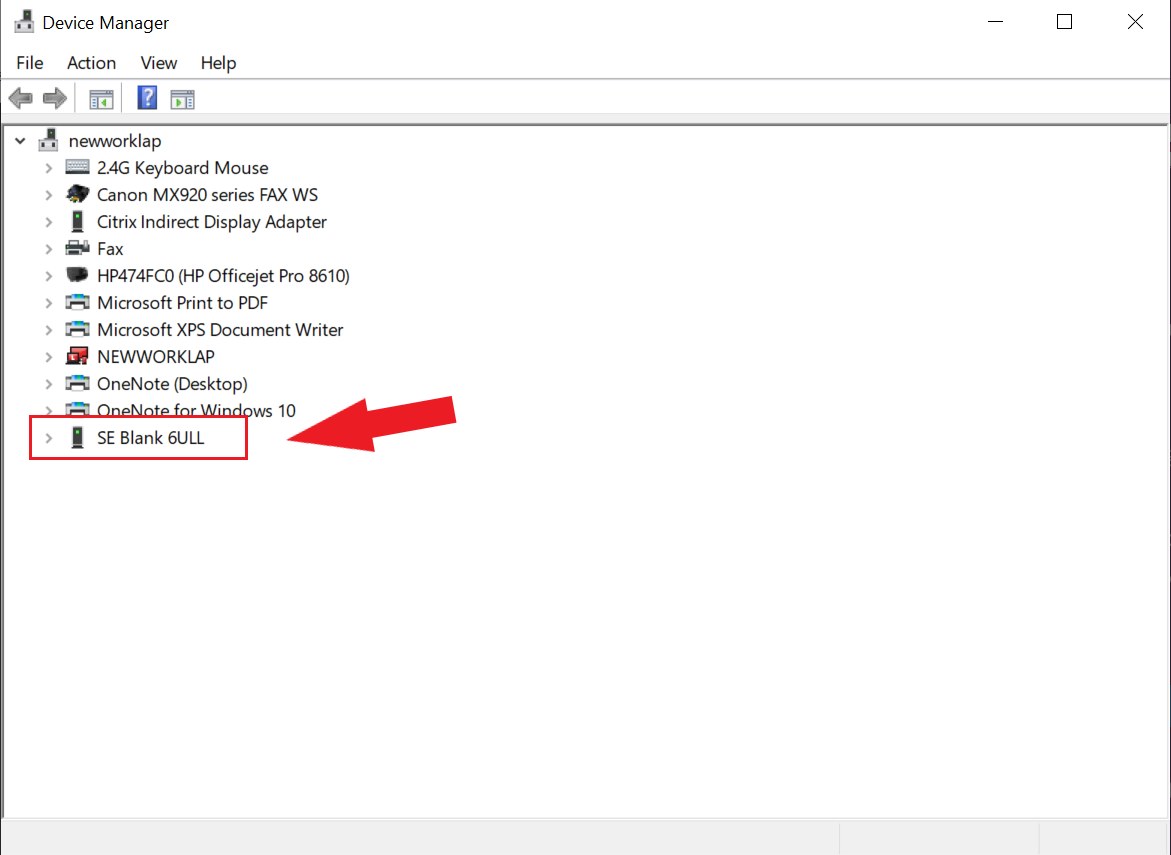
Run the command below to program the LmP to the EMMC:
C:\Users\Someone> mfgtool-files-imx6ullevk\uuu.exe mfgtool-files-imx6ullevk\full_image.uuu
  uuu (Universal Update Utility) for nxp imx chips -- libuuu_1.4.243-0-ged48c51

  Success 1    Failure 0


  1:92     6/ 6 [Done                                  ] FB: done
Turn off the power.
Put the board into run mode
Put the imx6ullevk into run mode by switching SW602 to ON, OFF to set the board to boot from eMMC.
Power on the imx6ullevk board by sliding the power switch SW2001 to ON.